Market
🏪 Market System
Buy and sell items with other players through the in-game market! List your items for sale, browse offers, and trade securely.

What is the Market?
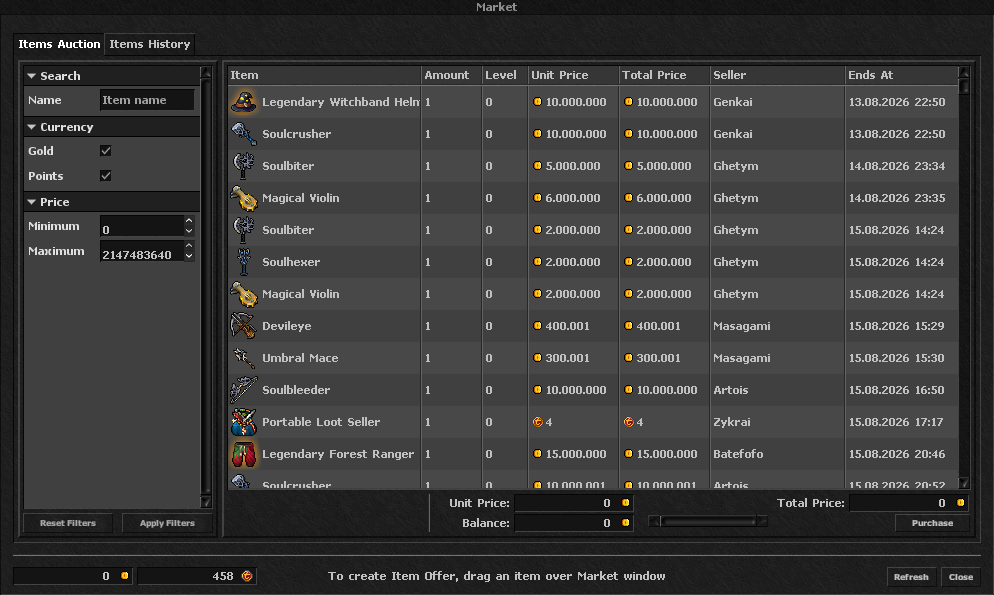
The Market is a player-driven trading system where you can buy and sell items safely. Create sell offers for your items, browse what other players are selling, and complete transactions without the need for direct player-to-player trades. All transactions are secure and automated!
- Click the Market button
 in the top menu bar
 - Browse available items or drag an item to sell from your inventory
- Use filters to find exactly what you're looking for
 na barra de menu superior
🏷️ Items Auction
Browse all items currently for sale by other players. Filter, sort, and find the best deals!
📜 Items History
View your sell and buy history. Track your active offers and cancel them if needed.
-
Drag your item from your inventory to the market drop area
-
Set your price - choose the unit price and total amount to sell
-
Choose currency - sell for Gold Coins or Premium Points
-
Create offer - confirm and your item will be listed for sale
Use powerful filters to find exactly what you need. Filter by item name, price range, item level, and more!
The market charges a small fee when you create a sell offer. This fee is a percentage of the total offer value and is deducted when you list your item. The fee helps maintain a healthy economy and prevents market manipulation. Check the fee percentage displayed when creating your offer!
Pro Tip
Check the market regularly for good deals! Prices fluctuate based on supply and demand. You can also sell anonymously if you prefer to keep your trades private. Use the Items History tab to manage your active offers and cancel them if you find a better deal elsewhere!